


- Table of contents
- E-Invoice LV E-rēķini
- 01 What is E-rēķins?
- 02 When do E-rēķini become mandatory?
- 03 How to set up E-rēķini via Docura
- 04 FAQ
- 05 Downloads
E-Invoice LV E-rēķini
01 What is E-rēķins?
- E-rēķins is structured electronic invoice that Latvia is gradually making mandatory for transactions between companies and public institutions. The legislation also provides for the mandatory submission of data on certain categories of electronic invoices to the State Revenue Service of Latvia (VID).
- E-rēķini are based on the European standard EN 16931 and the Peppol BIS Billing 3.0 specification, using the UBL 2.1 XML format.
- Docura allows you to send and receive e-invoices directly from/to your accounting software (ERP). To send E-rēķini through Docura, you don't even need to integrate your ERP system with the Docura platform.
02 When do E-rēķini become mandatory?
- From 1 January 2025 — mandatory electronic invoices for transactions with state and municipal institutions in the cases provided by law (B2G).
- From 1 January 2026 — mandatory submission of data on the relevant electronic invoices (B2G) to the State Revenue Service of Latvia (VID).
- From 1 January 2028 — mandatory electronic invoices between Latvian companies (B2B).
03 How to set up E-rēķini via Docura
Follow these six simple steps:
- Sign a service agreement with Docura
- Activate your company’s e-adrese An authorized representative of the company must log in to the government portal https://latvija.gov.lv/Content/eadrese and activate the company’s official electronic address (e-adrese) by following the instructions provided on the portal. The address has the following format: EINVOICE@registration_number.
- Complete the application on the VDAA portal
- The form from the website needs to be completed: https://viss.gov.lv/-/media/Files/VRAA/Dokumentacija/Vadlinijas/e-adrese/Dokumentacija_iestadem/eAdresetiesibuveidlapa2024papildpie.ashx
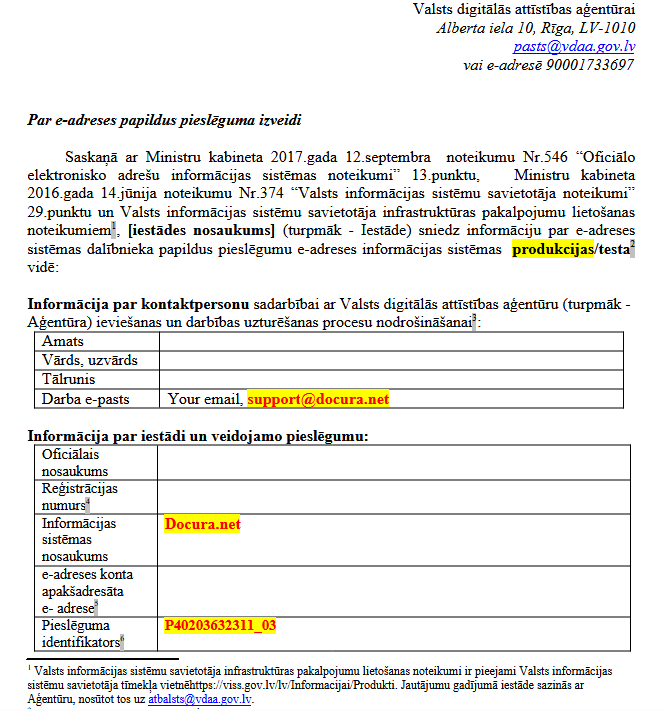
- When filling out the form, pay attention to the following fields:
- In the form field "produkcijas/testa", specify - produkcijas.
- In the "Darba e-pasts" specify support@docura.net in addition to yours, as without our email address we will not receive the emails.
- In the form field "Pieslēguma identifikators" specify Docura identicitation number P40203632311_03
- The form field "E-adreses konta apakšadresāta" - leave this field blank if documents were previously sent through another provider. If this is a new connection, specify your e-adrese - EINVOICE@registercode
- In the “Pieslēguma tiesības” field, select the following options: Ziņojumu nosūtīšana, Ziņojumu izgūšana, and Pieņem tikai e-rēķinus.

- Sign the application form and send it by email to support@docura.net.
- Docura signs the application on its side and submits it to VDAA.
- Once a response is received from VDAA, Docura completes the necessary settings.
- Estimated activation time: 1 week from the submission of the application.
- The form from the website needs to be completed: https://viss.gov.lv/-/media/Files/VRAA/Dokumentacija/Vadlinijas/e-adrese/Dokumentacija_iestadem/eAdresetiesibuveidlapa2024papildpie.ashx
- ERP settings (with or without integration)
There are two ways to setup sending E-rēķini from your ERP (accounting) system.- With ERP integration Setting up integration with your ERP system and Docura platform. In this case send request for connection to support@docura.net.
- Without ERP integration No integration is required. Simply configure email as the invoice delivery method in your ERP system.
- Check whether the Business partner record in ERP has a field for entering the recipient’s e-mail address.
- Get your technical email address from Docura, for example, your_company_name@edi.docura.net
- Enter and save this email address in the records of all business partners to whom you want to send invoices in E-rēķini format.
- If the field in ERP is not available, inform Docura. Our specialists will help you find a suitable way to add address.
- Send PDF invoices to your business partners from your ERP.
- Docura converts the PDF invoices into structured electronic invoices (E-rēķini) and delivers them to your partners' ERP systems.
- Testing Docura will test the invoice sending process and verify that the solution is ready for use. Once testing is successfully completed, you can start sending E-rēķini to your business partners on a regular basis.
- Go Live and monitoring Docura provides automated monitoring of document exchange. If an error occurs during invoice sending, you will receive an email notification so you can take the necessary action promptly. Support If you need assistance, please contact our support team at support@docura.net.
04 FAQ
01 How much does it cost?
Q: How much does it cost to activate the E-rēķini solution without ERP integration? I send approximately 300 invoices per month.
A: All prices are listed on our pricing page https://docura.net/lv/pricing-e-invoice/
One-time fees:- Connection to the app.docura.net platform — €99.
- Additional setup for PDF invoice processing — €199 (required if your ERP system is not integrated with Docura).
Total one-time setup cost: €298.
Monthly fees:- Subscription fee — €5 per month.
- Document processing fee — €0.10 per document.
Total monthly cost: €35. All prices exclude VAT.
05 Downloads
Download the presentation in English: E-Invoice_LV_E-Rekini_EN.pptx
Download the presentation in Latvian: E-Invoice_LV_E-Rekini_LV.pptx
Download the presentation in Russian: E-Invoice_LV_E-Rekini_RU.pptx