


REST-API
Docura rest API is simple way to exchange documents with your EDI partner via Docura.net system.
1. API itself is very easy and intuitive.
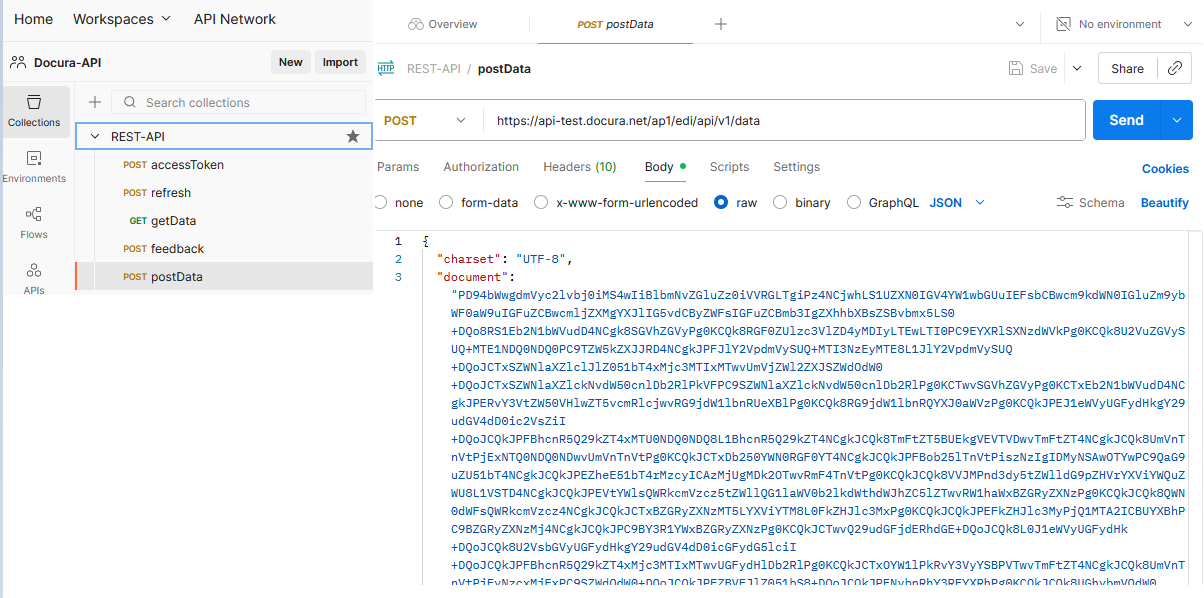
2. API manual (EN): https://docs.google.com/document/d/1PZN4D-Ma-2SdBsBhdtW832Z6sIy2tShQaRs2JPz1QgM/
3. Postman (EN) project JSON file (download and import to Postman): https://drive.google.com/file/d/1hG7kMFC8YQDktX0N0j6vRK15yJBwlyGp/
4. There are test and production servers:
https://api-test.docura.net/ap1/edi/api/v1/
https://api.docura.net/ap1/edi/api/v1/
5. You need clientId, clientSecret for authorization. Request from support@docura.net or register yourself on app-test.docura.net (test) or app.docura.net (live). Instruction is here:
6. Docura URL:
https://api.docura.net/ap1/edi/api/v1/
auth/accessToken
auth/refresh
data (GET)
data (POST)
data/feedback
e.g.
https://api.docura.net/ap1/edi/api/v1/auth/accessToken
https://api.docura.net/ap1/edi/api/v1/data
7. Test users for the Test environment (better you use your own): https://api-test.docura.net/ap1/edi/api/v1/
EDI Buyer (send ORDER, receive INVOICE)- ClientID: 100015740@user.docura.net
- Client Secret: 705839ef26b0438da861942026fad48a
- ClientID: 100018680@user.docura.net
- Client Secret: 28f337c1e82246ed9e7a6e0787ce4d07
https://redmine.docura.net/projects/docura-manual-en/wiki/01_EDI_quick_start#03-Docura-REST-API