


Сredit note
- Table of contents
- Сredit note
- 01 What is a credit note
- 02 When a credit note is used
- 03 Credit note structure in Docura
- 04 Integration with EDI
01 What is a credit note
- A credit note is a commercial and accounting document issued by the seller to the buyer to reduce the amount payable on a previously issued invoice.
- Typical reasons are returns, quantity or price corrections, discounts, rebates or other adjustments related to the original invoice.
- In EDI, a credit note is an electronic business document similar to an invoice, but with negative quantities and/or amounts, so ERP systems automatically update receivables, payables and VAT.
02 When a credit note is used
Credit notes are used in typical business scenarios:
- Returned or damaged goods – part or all of the delivered goods are returned; the seller issues a credit note for the returned quantity instead of a new “negative” invoice.
- Price or quantity correction – the original invoice contained wrong unit price, tax rate, discount or quantity, and this needs to be corrected while keeping a clear audit trail.
- Bonuses and retrospective discounts – the buyer fulfils agreed conditions (turnover, payment discipline etc.), and the seller grants an after-the-fact discount via credit note, reducing the total amount due.
- Service level or quality issues – if the seller compensates the buyer (e.g. delays, quality problems) by reducing the invoiced amount, this is often documented with a credit note for transparency and tax purposes.
- In many jurisdictions the credit note is required to legally reduce VAT and revenue tied to the original invoice.
03 Credit note structure in Docura
*Main elements:/
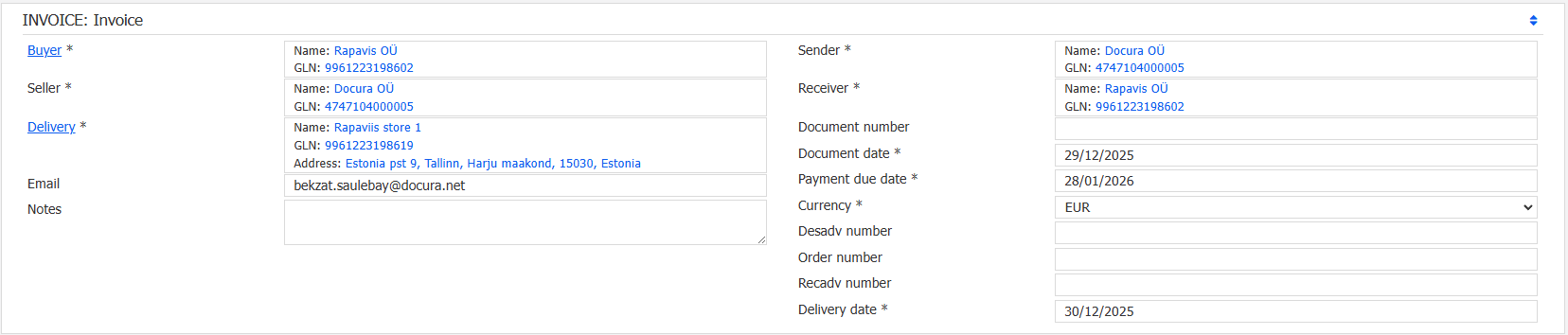
- Parties – Buyer, Seller and Delivery address fields identify the trading partners (e.g. Rapavis OÜ as buyer, Docura OÜ as seller, and a specific store as delivery location).
- Document metadata – document number, document date, payment due date, currency (EUR) and delivery date ensure traceability and link the credit note to the business process and original # invoice.
- Line item data – item description, GTIN, supplier item code and unit of measure describe the product that is being credited.
- Negative quantity – quantity is set to -1, which technically means that one unit is removed from the previously invoiced quantity.
- Amounts and VAT – net price is positive, but net amount, tax amount and total gross amount are negative, so the total document value is -4.33 EUR in this example.
- Because the structure mirrors a normal invoice, Docura and partner ERPs can process the credit note automatically and post the opposite accounting entries.
The first Docura screen shows a credit note that looks almost identical to a sales invoice, but represents a negative adjustment.

The second Docura screen focuses on the single credit line and resulting totals.
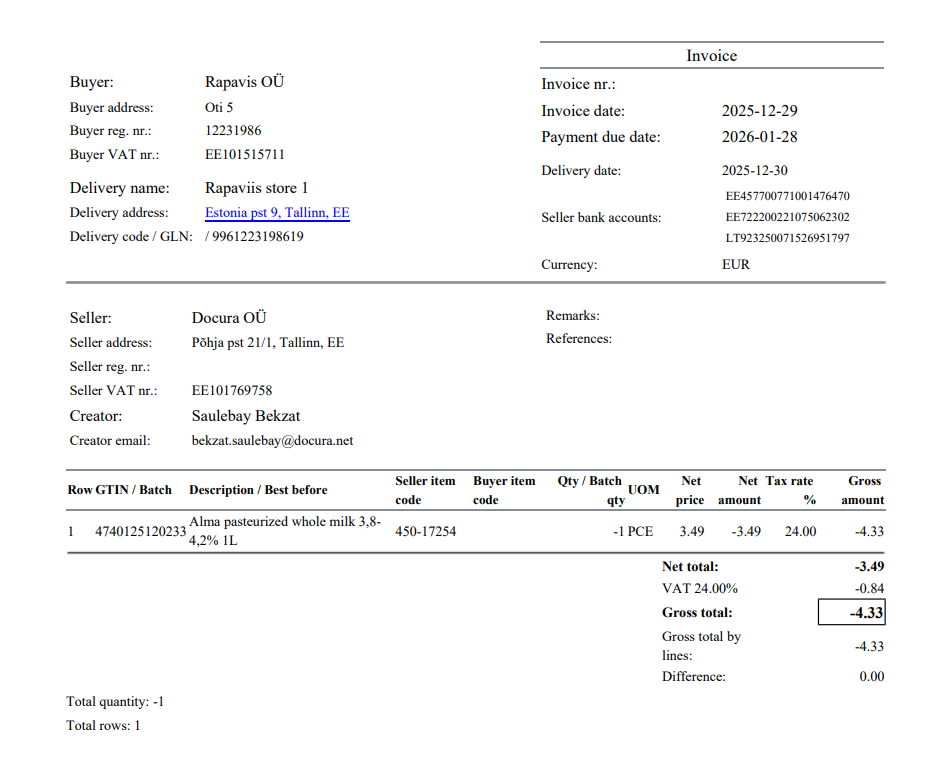
- Quantity: -1 piece of “Alma pasteurized whole milk 3,8–4,2”.
- Net price: 3.490 EUR; with quantity -1 this becomes net amount -3.49 EUR.
- VAT: with a 24% tax rate, VAT on -3.49 EUR is -0.84 EUR (rounded).
- Total gross amount: net amount -3.49 EUR + tax amount -0.84 EUR = -4.33 EUR.
- This means the buyer’s payable and the seller’s receivable are both reduced by 4.33 EUR compared to the original invoice, while VAT is corrected by -0.84 EUR in tax reports.
04 Integration with EDI
- In an EDI environment, the credit note follows the same automated flow as an invoice, but with negative QUANTITY values.
- Standard formats – credit notes are exchanged in formats such as EDIFACT, XML (including Docura XML), Peppol BIS or other agreed standards between partners.
- Reference to original invoice – the EDI message typically includes the original invoice number so both ERPs can match the credit note and apply the correction automatically.
- Seller’s ERP generates the credit note and sends it via EDI provider (Docura).
- Docura validates and converts the document if needed and forwards it to the buyer.
- Buyer’s ERP imports the credit note, links it to the original invoice and updates accounting entries (AP/AR and VAT) without manual data entry.
This automation ensures consistent balances between trading partners and provides a clear, auditable history of all corrections to original invoices.