


- Table of contents
- Eesti Energia AS
- 01 How it works
- 02 Contacts
- 03 Product catalog (PRODUCTCATALOG)
- 04 Delivery points (LOCCAT)
- 05 Supplier document requirements
- 06 Connecting to Docura
- 07 Letter from Eesti Energia AS (EE)
Eesti Energia AS
Enefit Industry OÜ
Reg. code: 10579981
GLN: 2000078260007
Country: EE
Enefit Power OÜ
Reg. code: 17209649
GLN: 2000078250008
Country: EE
Documents: PRODUCTCATALOG (incoming), LOCCAT (outgoing), ORDER (outgoing), ORDRSP (incoming), DESADV (incoming)
E-mail gateway: enefit.ee@edi.docura.net (product catalog)
Aliases:
Eesti Energia AS is an energy group comprising Enefit Power OÜ and Enefit Industry OÜ. Within this process, Enefit Power OÜ and Enefit Industry OÜ place purchase orders via the Docura platform and receive order confirmations and dispatch advices from suppliers electronically. This page describes what a supplier needs to do to connect and work with Eesti Energia group companies through Docura.
01 How it works
- You send your product catalog (Excel) to enefit.ee@edi.docura.net. Docura uploads it into the Eesti Energia AS ordering system as a PRODUCTCATALOG (assortment).
- Eesti Energia AS creates an ORDER and it is delivered to you via Docura EDI.
- You deliver the goods and send a DESADV via Docura — with the Eesti Energia AS order number.
| # | Document | Direction | Format | Channel |
|---|---|---|---|---|
| 1 | PRODUCTCATALOG | Supplier → Eesti Energia AS | Excel — template PRODAT_Enefit.xlsx, see 03 | e-mail to enefit.ee@edi.docura.net |
| 2 | LOCCAT | Eesti Energia AS → Supplier | Excel attachment: LOCCAT_enefit.xlsx, see 04 | this page / Docura.net |
| 3 | ORDER | Eesti Energia AS → Supplier | Agreed supplier format | Docura EDI |
| 4 | ORDRSP | Supplier → Eesti Energia AS | Agreed supplier format | Docura EDI |
| 5 | DESADV | Supplier → Eesti Energia AS | Agreed supplier format | Docura EDI |
ORDER, ORDRSP, DESADV are exchanged. Invoice is not required.
02 Contacts
| Topic | Contact |
|---|---|
| Assortment, prices, orders, deliveries | (to be confirmed), Eesti Energia AS procurement — enefit.ee@edi.docura.net |
| Docura connection, formats, technical questions | Docura support — support@docura.net, +372 55948981 (Ion Braga, EE), online chat at www.docura.net |
When corresponding about the connection, please keep support@docura.net in copy.
03 Product catalog (PRODUCTCATALOG)
- Send your current product catalog in Excel format to enefit.ee@edi.docura.net. Template: PRODAT_Enefit.xlsx
- Docura converts it into a PRODUCTCATALOG and uploads it into the Eesti Energia AS ordering system. You will receive a confirmation by e-mail.
- Send a new file every time item codes or assortment change. Always send the full list — items missing from the new file are removed from the assortment.
- E-mail subject: your company name + date.
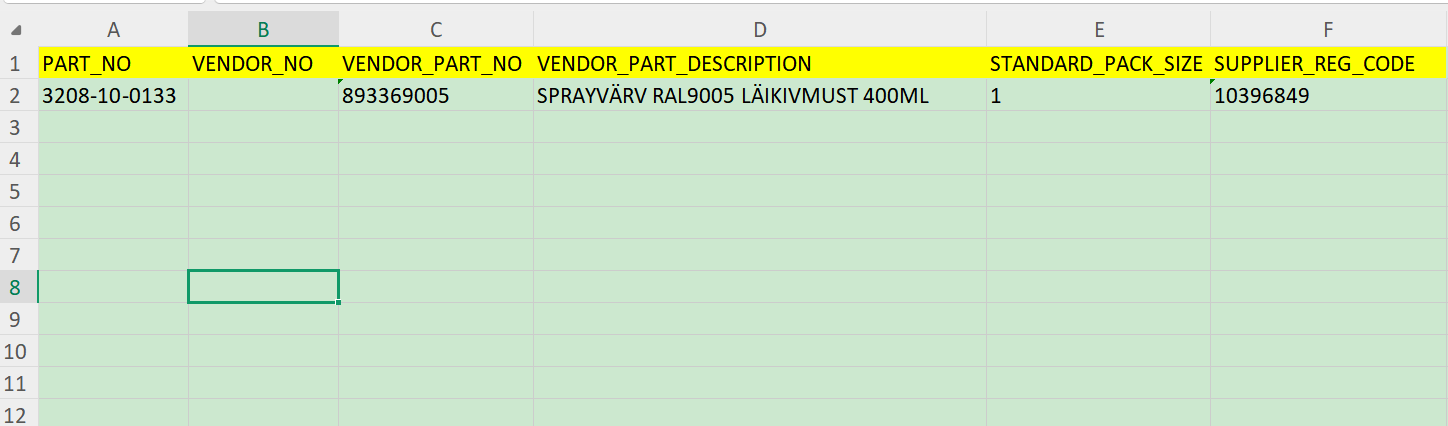
Excel layout:
| Column | Field | Mandatory | Comment |
|---|---|---|---|
| A | PART_NO | Yes | Buyer's item code |
| B | VENDOR_NO | No | Your organisation code in the buyer's system. |
| C | VENDOR_PART_NO | Yes | Your item code. Key field — the same code is returned in the ORDER and must be used in ORDRSP and DESADV lines. |
| D | VENDOR_PART_DESCRIPTION | Yes | Item name |
| E | STANDARD_PACK_SIZE | Yes | Standard quantity of goods in one package (e.g. number of pieces in a box/pack). |
| F | SUPPLIER_REG_CODE | Yes | Supplier registration code used for identification. |
04 Delivery points (LOCCAT)
- All Eesti Energia AS delivery points are listed in the attached LOCCAT: LOCCAT_enefit.xlsx — GLN, name, address.
- The same list is available on Docura.net in the company profiles of Enefit Power OÜ and Enefit Industry OÜ, members of the Eesti Energia AS group: open the relevant partner in your partner list → delivery points. The list is updated there when Eesti Energia AS adds a new or closes an existing delivery point.
- Each ORDER contains the delivery point GLN, name, address and contact details — register the GLN as a delivery address code in your ERP.
05 Supplier document requirements
- The Eesti Energia AS order number must be included in all documents sent to the buyer.
- One order confirmation/dispatch advice = one order. Do not combine multiple orders in one order confirmation/dispatch advice.
- In the DESADV it is recommended, where possible, to include the tracking number and carrier information.
06 Connecting to Docura
Docura.net is an EDI and e-invoicing platform operating in Estonia, Latvia and Lithuania. It connects buyers, suppliers and their ERP systems for the exchange of orders, invoices and other trade documents, and works both with and without integration: small suppliers use the free web-based EDI interface in a browser, larger ones connect their ERP via API, SFTP or e-mail.
- Reply to the Eesti Energia AS letter providing the contact person who will handle orders and invoices (name, e-mail, phone). Copy support@docura.net.
- Send your product catalog (Excel, template PRODAT_Enefit.xlsx) to enefit.ee@edi.docura.net.
- Get access to Docura.net. If you are not yet a Docura user, register — see 01_EDI-Web_description. If you already use Docura for other buyers, Docura will simply add Eesti Energia AS to your partner list — no new development required.
- Choose a channel for ORDER, ORDRSP and DESADV. They can differ — for example, receiving orders by e-mail and sending dispatch advices from your ERP.
- Test. Docura sends a test ORDER to the chosen channel; you return a test ORDRSP and DESADV. Docura confirms the setup.
- Go live. From the date stated in the Eesti Energia AS letter, all orders are received exclusively via Docura.
01 Receiving ORDER
Choose one option:
| Channel | How it works | What you need to do |
|---|---|---|
| EDI-Web | The ORDER appears in Docura.net (Documents → Received). An e-mail notification with a brief order summary is sent to your contact address. | Provide Docura with the e-mail address(es) to receive notifications. Log in to Docura.net to view and print the order. |
| ERP Integration | Docura delivers the ORDER as XML to your system via Partner_API, Docudrive or SFTP_FTP. Docura can convert it to the format already used by your ERP (EDIFACT, Telema/Edisoft XML, CSV, others). | Agree on format and channel with support@docura.net. If you already receive orders from another Docura buyer this way, nothing changes — Eesti Energia AS orders arrive via the same channel. |
| The ORDER is sent as an XML attachment (Docura_XML_ORDER) with a readable summary in the e-mail body. | Provide Docura with an e-mail address for orders. Suitable for automatic import into your ERP from a mailbox. |
In all cases the ORDER contains: Eesti Energia AS order number, delivery point (GLN, address, contact, delivery time), your item codes, quantities in your units of measure and minimum order step.
02 Sending ORDRSP, DESADV
Choose one option:
| Channel | How it works | What you need to do |
|---|---|---|
| EDI-Web | In Docura.net open the received ORDER and click Create order confirmation. The order number, delivery point and lines are copied automatically; adjust quantities and send. The dispatch advice is created in the same way. | No integration required. A Docura.net user account is needed. |
| ERP Integration | Your ERP exports the order confirmation and dispatch advice, and Docura delivers it to Eesti Energia AS. Accepted formats: Docura XML (Docura_XML_INVOICE), EDIFACT, Telema/Edisoft XML — Docura converts. Channels: Partner_API, Docudrive, SFTP_FTP. | Ensure the document contains the Eesti Energia AS order number and your item codes (see 05). Agree on format with support@docura.net. |
07 Letter from Eesti Energia AS (EE)
Subject: Eesti Energia AS: transition to electronic order and shipment document exchange from [DATE]
Dear partners,
Eesti Energia AS wishes to inform you of important changes in cooperation with suppliers. To reduce manual work and optimise business processes, Eesti Energia group companies — Enefit Power OÜ and Enefit Industry OÜ — are transitioning to electronic document exchange via the Docura.net platform.
As part of this process, the following documents will be exchanged via Docura EDI:
- ORDER — purchase order from Enefit Power OÜ / Enefit Industry OÜ to the supplier.
- ORDRSP — order confirmation from the supplier.
- DESADV — dispatch advice from the supplier.
This transition will also benefit you: electronic document exchange will free your staff from manual data entry, reduce the risk of errors and speed up order and delivery processing.
Connecting is straightforward: if you already have an interface with any EDI system, the existing solution can in most cases be used for connecting to Docura as well. Detailed instructions, document format descriptions and sample files (ORDER, ORDRSP, DESADV) are available in the wiki: [WIKI LINK]
Cooperation procedure from [DATE]:
- Enefit Power OÜ and Enefit Industry OÜ will create orders and send them to you via the Docura EDI system. To receive orders, you need to connect to the Docura EDI system.
- For each ORDER received, an order confirmation ORDRSP must be sent, specifying the confirmed quantities and any changes to the order if applicable.
- ORDRSP, a DESADV must be sent with information on the actually shipped items and quantities. Where possible, please also include the tracking number and carrier information.
The document formats are based on widely used EDI standards. If you already exchange electronic documents with other partners, your existing solution is in most cases compatible and no additional development is typically required.
If you have any questions, please reply to this e-mail — we will be happy to help.
Kind regards,
[FIRST NAME LAST NAME], [POSITION]
Eesti Energia AS, [PHONE] | [E-MAIL]
Technical support for connection: Ion Braga Docura OÜ, Tel: +372 55948981 support@docura.net, online chat www.docura.net