


- Table of contents
- Fristar SIA
- 01 How it works
- 02 Price list (PRICAT)
- 03 Receiving ORDER
- 04 Sending INVOICE
- 05 Requirements for INVOICE
- 06 Fristar GLNs
- 07 Connecting to Docura
Fristar SIA
Reg. code: 40003658252
GLN: 9973658250008
Country: LV
Documents: PRICAT (in), ORDER (out), INVOICE (in)
E-mail gateway: fristar.lv@edi.docura.net (price lists and invoices)
Aliases: Fristar, Fristar SIA, SIA Fristar, fristar.lv
Fristar SIA operates school and kindergarten canteens in Latvia (Rīga, Jelgava, Valmiera and other towns — 44 delivery points). Fristar SIA places all purchase orders through the Docura platform and receives invoices electronically. This page describes what a supplier needs to do to work with Fristar SIA.
01 How it works
- You send your price list (Excel) to fristar.lv@edi.docura.net. Docura loads it into Fristar's ordering system as PRICAT (prices) from Sender to Receiver
- Fristar SIA creates an ORDER in Docura and it is delivered to you via Docura EDI or by email.
- You deliver the goods and send an INVOICE via Docura (EDI or by email) with the Fristar order number.
- Fristar SIA confirms the invoice on goods receipt. If something differs (quantity, price, quality), you receive a reclamation e-mail and issue a credit invoice.
| Nr | Document | Direction | Format | Channel |
|---|---|---|---|---|
| 1 | PRICAT | Supplier → Fristar | Excel — template PRICAT_example.xls, see 02 | e-mail to fristar.lv@edi.docura.net |
| 2 | ORDER | Fristar → Supplier | Docura XML, see Docura_XML_ORDER | Docura EDI, see 03 |
| 3 | INVOICE | Supplier → Fristar | Docura XML, see Docura_XML_INVOICE, or e-rēķins (E-Invoice_LV_E-Rekini) | Docura EDI, see 04 |
| 4 | Reclamation | Fristar → Supplier | your contact e-mail | |
| 5 | Credit invoice | Supplier → Fristar | same as INVOICE | same as INVOICE |
02 Price list (PRICAT)
- Send your current price list as Excel to fristar.lv@edi.docura.net. Template: PRICAT_example.xls (the same layout as used for Baltic Restaurants Latvia SIA).
- Docura converts it into PRICAT and loads it into Fristar's ordering system. You get a confirmation e-mail.
- Send a new file every time prices or assortment change. Always send the full list — items that are missing from the new file are removed from the assortment.
- Subject line: your company name + "Cenu lapa" + date.
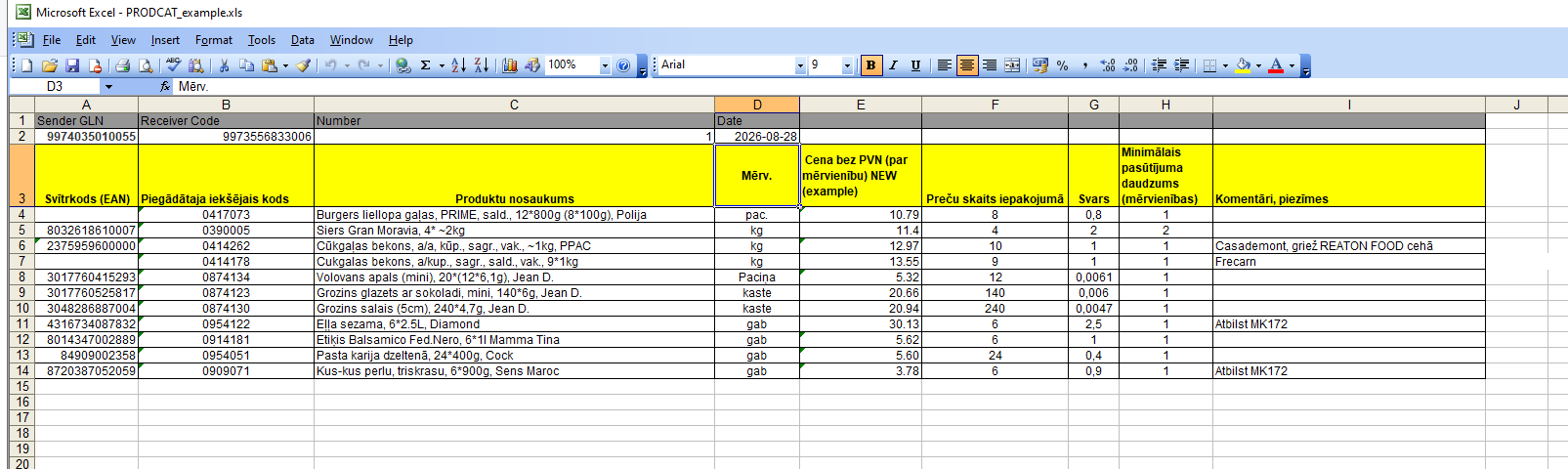
Excel layout (sheet "Catalog"):
| Rows 1–2 | Value |
|---|---|
| Sender GLN | Your GLN |
| Receiver Code | 9973658250008 (Fristar SIA) |
| Number | Price list number (unique) |
| Date | Price list date |
| Column | Field | Required | Comment |
|---|---|---|---|
| A | Svītrkods (EAN) | if exists | GTIN of the unit you sell |
| B | Piegādātāja iekšējais kods | yes | Your item code. Key field — the same code comes back in ORDER and must be used in INVOICE lines. |
| C | Produktu nosaukums | yes | Item name |
| D | Mērv. | yes | Unit of measure in which the item is ordered and invoiced (kg, gab, pac., kaste …) |
| E | Cena bez PVN (par mērvienību) | yes | Net price per unit, without VAT |
| F | Preču skaits iepakojumā | yes | Units per package |
| G | Svars | Weight of one unit, kg | |
| H | Minimālais pasūtījuma daudzums | yes | Minimum order step. Fristar orders only multiples of this value (step 15 → 15, 30, 45 …). |
| I | Komentāri, piezīmes | Free text (brand, MK172 compliance etc.) |
03 Receiving ORDER
Choose one:
| Channel | How it works | What you need to do |
|---|---|---|
| EDI-Web | The ORDER appears in Docura.net (Documents → Received). An e-mail notification with the order summary is sent to your contact address. | Tell Docura which e-mail(s) receive notifications. Log in to Docura.net to view and print the order. |
| ERP integration | Docura delivers the ORDER as XML to your system via Partner_API, Docudrive or SFTP_FTP. Docura can convert it into the format your ERP already uses (EDIFACT, Telema/Edisoft XML, CSV, other). | Agree the format and channel with support@docura.net. If you already receive orders from another Docura buyer in this way, nothing changes — Fristar orders arrive through the same channel. |
| The ORDER is sent as an XML attachment (Docura_XML_ORDER) with a readable summary in the e-mail body. | Give Docura the e-mail address for orders. Suitable for automatic import into your ERP from a mailbox. |
In all cases the ORDER contains: Fristar order number, delivery point (GLN, address, contact, delivery time), your item codes, quantities in your units and the minimum order step.
04 Sending INVOICE
Choose one:
| Channel | How it works | What you need to do |
|---|---|---|
| EDI-Web | In Docura.net open the received ORDER and click Create invoice. Order number, delivery point and lines are copied automatically; adjust delivered quantities, add invoice number and date, send. | Nothing to integrate. Requires a Docura.net user. |
| ERP integration | Your ERP exports the invoice and Docura delivers it to Fristar. Accepted formats: Docura XML (Docura_XML_INVOICE), e-rēķins (E-Invoice_LV_E-Rekini), EDIFACT, Telema/Edisoft XML — Docura converts. Channels: Partner_API, Docudrive, SFTP_FTP. | Make sure the invoice carries the Fristar order number and your item codes (see 05.02). Agree the format with support@docura.net. |
| Send the invoice as an XML attachment to fristar.lv@edi.docura.net — one invoice per e-mail. Docura imports it and delivers it to Fristar. | Set up your ERP to e-mail the XML, or attach it manually. PDF attachments are not processed. |
Credit invoices are sent through the same channel as invoices, with a reference to the original invoice (see 05.03).
05 Requirements for INVOICE
01 Fristar order number is mandatory
- Every invoice must contain the Fristar SIA order number from the ORDER (
Order-Header/OrderNumber). - Docura XML:
Invoice-Header/Order/BuyerOrderNumberandLine/Line-Order/BuyerOrderNumber. - Invoices without an order reference are not accepted and are returned to the supplier.
- One invoice = one order. Do not combine several orders in one invoice.
02 Line items
- Your item code (
SupplierItemCode) is mandatory on every line and must match the price list (column B). - EAN/GTIN — when it exists in the price list.
- Unit of measure and net unit price must match the price list valid on the order date.
03 Reclamations and credit invoices
- Fristar SIA confirms your invoice on goods receipt. If quantity, price or quality differ, you receive a reclamation e-mail with a description.
- Issue a credit invoice with a reference to the original invoice number and date and send it the same way as invoices.
- No other return or receiving documents are exchanged.
06 Fristar GLNs
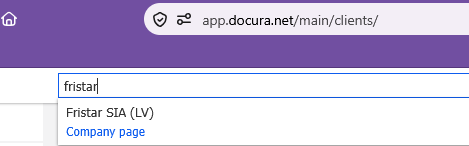
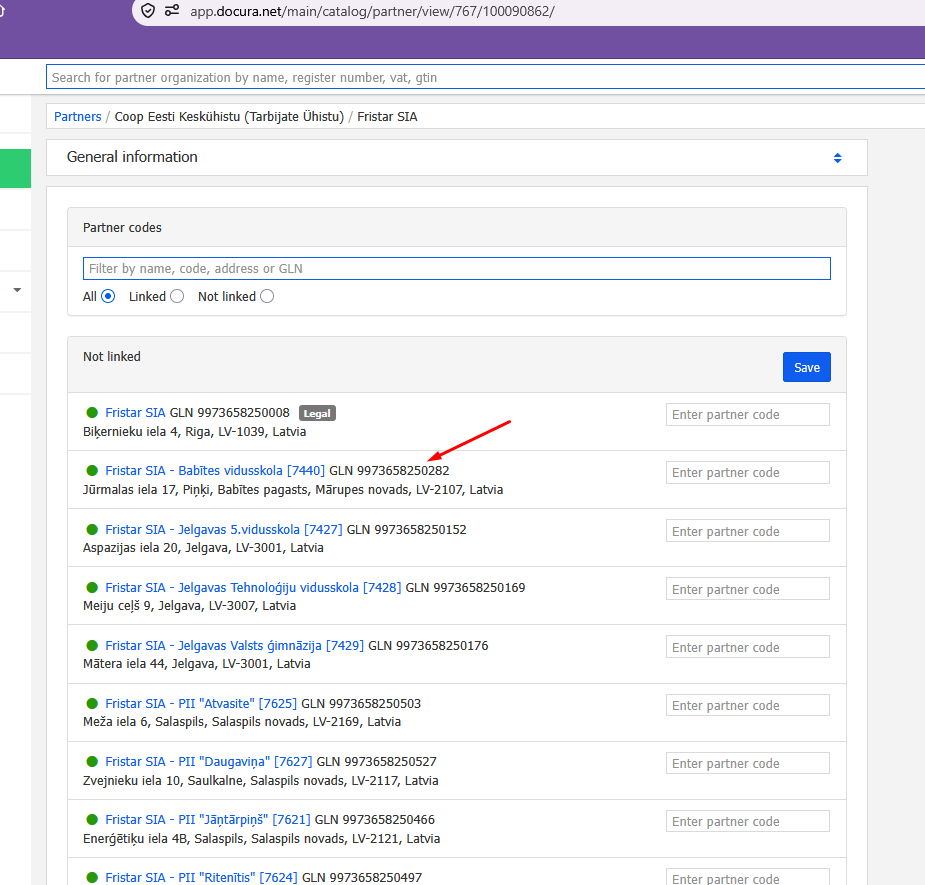
- GLNs of all stores are shown in the Docura.net web portal https://docura.net — register and search for Fristar in the search field at the top of the page.
07 Connecting to Docura
Docura.net is an EDI and e-invoicing platform operating in Latvia, Estonia and Lithuania. It connects buyers, suppliers and their ERP systems for the exchange of orders, invoices and other trade documents, and works both with and without integration: smaller suppliers use the free EDI-Web interface in a browser, larger ones connect their ERP via API, SFTP or e-mail. In Latvia Docura LV SIA is a registered e-rēķins service provider, so invoices can also be delivered as official Latvian e-invoices. One connection to Docura works for all buyers on the platform — Fristar SIA is simply added as a partner.
- Reply to the Fristar letter with the contact person who will handle orders and invoices (name, e-mail, phone). CC support@docura.net.
- Get access to Docura.net. If you are not yet a Docura user, register — see 01_EDI-Web_description. If you already work with Docura for other buyers (e.g. Baltic Restaurants Latvia SIA), Docura simply adds Fristar SIA to your partner list — no new development.
- Read the Quick Start: EDI Quick Start.
- Choose the channel for ORDER (03) and INVOICE (04). They can differ — e.g. receive orders by e-mail, send invoices from your ERP.
- Test. Docura sends a test ORDER to the chosen channel; you return a test INVOICE. Docura confirms the setup.
- Go-live. From the date in the Fristar letter, all orders come only via Docura.
Technical support for the connection: Docura support — support@docura.net, online chat at www.docura.net. Getting started: EDI Quick Start.