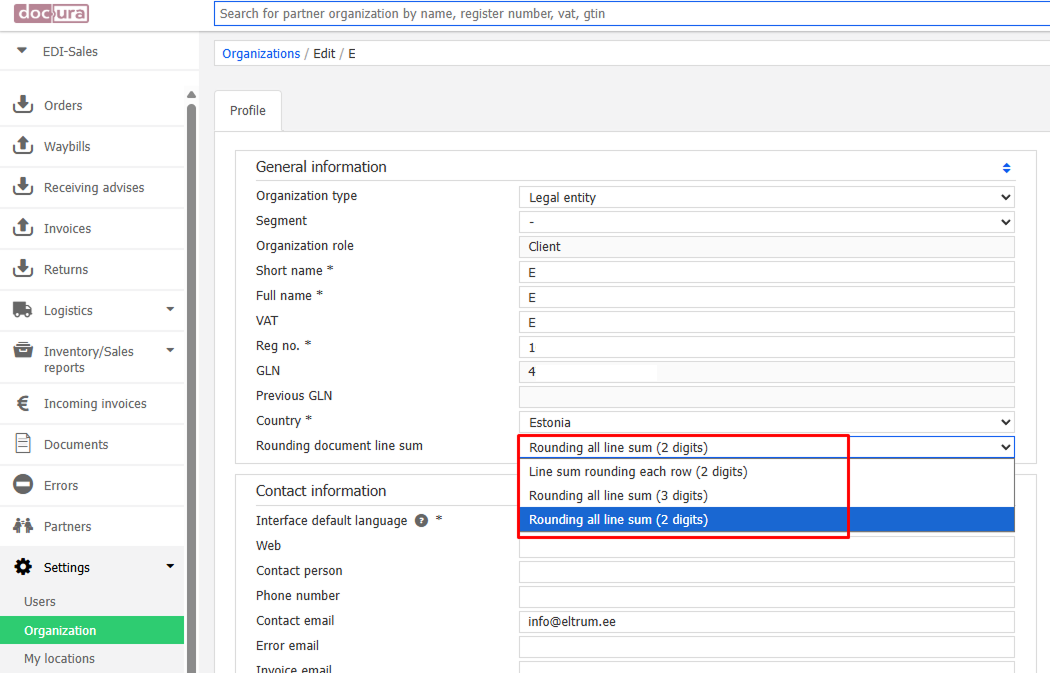
Two VAT calculation modes are available on the Docura platform:
- Calculating the tax amount for each line item
- VAT is calculated separately for each line item (row), taking two decimal places into account.
- Calculating the total amount with subsequent taxation
- First all line items are summed up and then VAT is added to the total. In this mode three decimal places are taken into account.
Reasons for choosing a mode
Different companies choose one of these modes depending on their internal accounting policy and the accuracy of the calculation. With the first mode the calculation is more detailed at the level of each line item; with the second the final amount is more accurate thanks to fewer rounding errors.
Setting up the VAT calculation mode for your organisation
To choose the VAT calculation mode, follow these steps:
- Open Settings.
- Select the Organization section.
- In the Profile section find the parameter Rounding document line sum.
- Select the suitable tax calculation mode.
Note: setting up the VAT calculation mode correctly helps your company to meet the requirements of accounting and tax reporting.