


Partners, codes and GLNs
- Table of contents
- Partners, codes and GLNs
- 01 Why partner codes are needed
- 02 Partner (legal entity) code
- 03 Delivery location code (store code)
- 04 GLN
- 05 How the codes end up on the document
- 06 Where the codes are entered in Docura
- 07 Typical mistakes
- 08 What this means in specific ERPs
- 09 Checklist before going live
- Read more
01 Why partner codes are needed
In EDI systems do not exchange names — they exchange codes. Every partner (legal entity) and every delivery location must have a code that is agreed between the parties and entered identically in both ERPs and in Docura.
- The code is the only identifier that links an incoming document to the right partner and the right store.
- The same code must therefore exist in three places: in the sender's ERP, in the receiver's ERP and in Docura, on the partner card.
- The codes are entered once during setup; after that documents move automatically.
02 Partner (legal entity) code
- Identifies the legal entity — the buyer or the supplier as a company.
- On the document it is passed in the customer block (
BuyerParty/PartyCode), and in the seller's block respectively. - In Docura this code is linked on the partner card to the Legal address (the parent company), not to a store.
- In an ERP it is usually the customer number: the Kood on the StandardBooks contact card, the client code in Directo, the customer card in Merit, and so on.
03 Delivery location code (store code)
- One legal entity can have many delivery points — stores, warehouses, terminals.
- Each delivery point has its own code, which on the document goes into
DeliveryParty/PartyCode. This is the code the retailer prints on the order as the store code. - The ordering address, if it differs from the delivery address, has its own code →
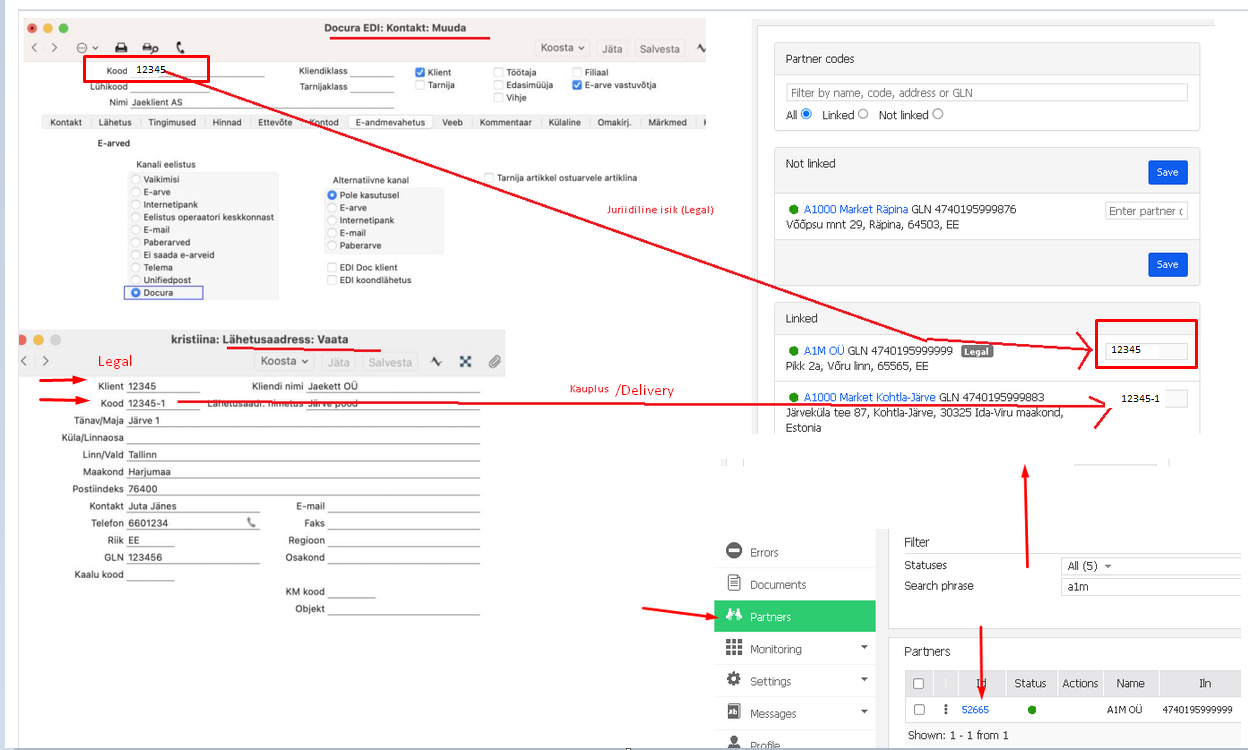
OrderParty/PartyCode. - In Docura each of these codes is linked on the partner card to the corresponding address of that store.
A common convention is a base code plus a suffix: the legal code 12345, then the stores 12345-1, 12345-2 …
The contact (legal entity) code and the delivery location code must not coincide.
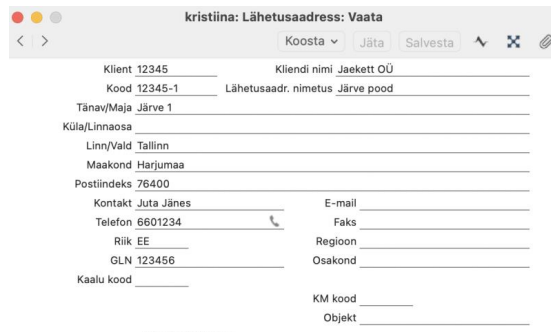
The screenshot below shows both sides of the same link. On the left — the StandardBooks contact card (Kood 12345) and its delivery address (Kood 12345-1). On the right — the Partner codes panel in Docura, where 12345 is linked to the Legal record (A1M OÜ, GLN 4740195999999) and 12345-1 to the store A1000 Market Kohtla-Järve (GLN 4740195999883).
04 GLN
- GLN (Global Location Number) is a 13-digit international identifier of a location or a legal entity under the GS1 system; the last digit is a check digit.
- Where a GLN exists it can be used instead of the own agreed code, or together with it: it is unique by nature, so there is no need to agree a code manually.
- In Docura both a partner organisation and each of its locations have a GLN. In the Partner codes panel you can filter records by name, code, address or GLN — which is the quickest way to match an unknown partner.
- A GLN is required when the partner demands it: Peppol, retail chains, e-invoice operators. If the partner has no GLN, the own agreed code is used.
- In some ERPs the GLN is a separate field on the delivery address (in StandardBooks, on the delivery address card) and it has to be filled in whenever the partner works with GLNs.
05 How the codes end up on the document
The Party blocks of the XML are formed from the codes:
- Customer:
BuyerParty/PartyCode - Delivery address code:
DeliveryParty/PartyCode - Ordering address code:
OrderParty/PartyCode
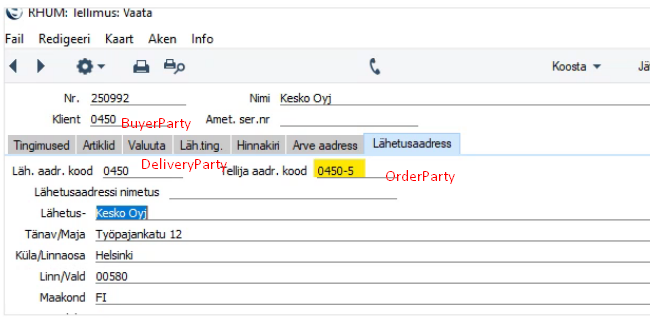
In the example above: the client code 0450 goes to BuyerParty, the delivery address code 0450 to DeliveryParty, and the ordering address 0450-5 to OrderParty.
06 Where the codes are entered in Docura
- Addresses are created under "Settings" → "Partner addresses"; every address gets its code (the location code).
- On the partner card the codes are linked to addresses in the Partner codes panel: filter by name, code, address or GLN, with the sections Not linked and Linked. A record that stays unlinked means Docura cannot match that partner on an incoming document.
- On the same partner card (tab E-data interchange) the Channel preference must be set to Docura; for partners with whom despatch advices are exchanged, the option EDI Doc client must be selected in addition.
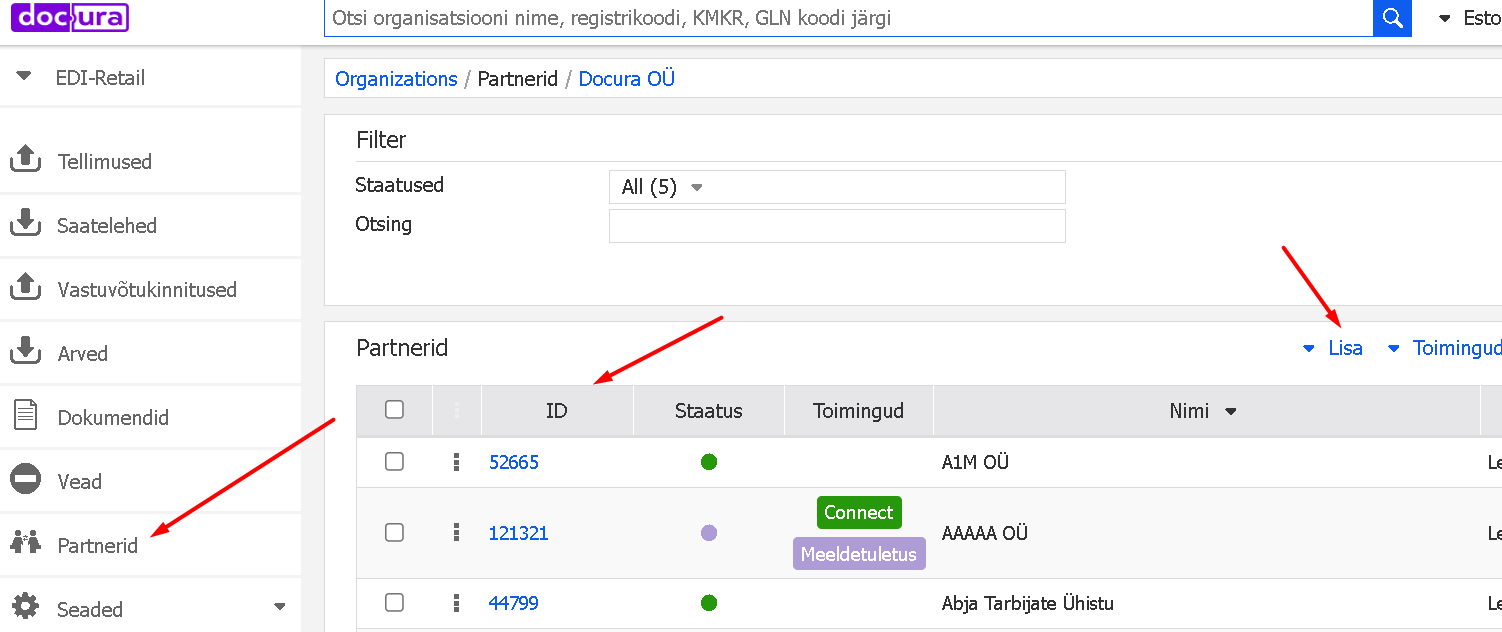
Viewing partners and adding an address.
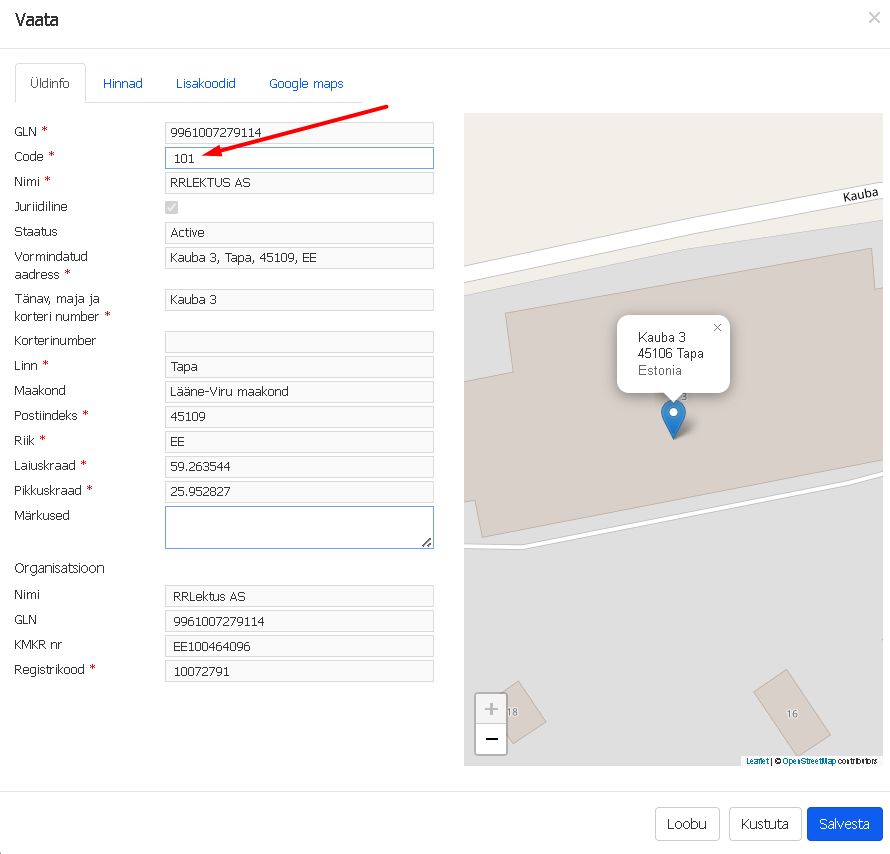
Adding a partner address and a location code.
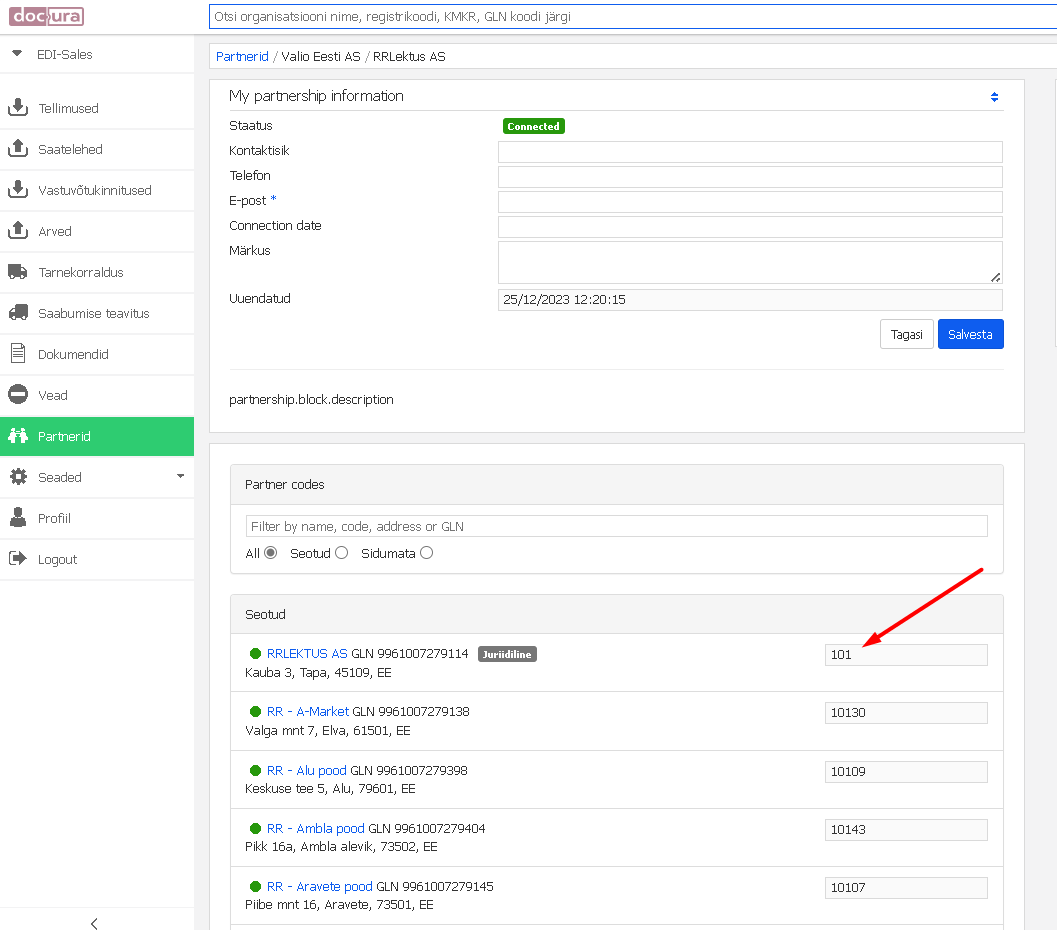
Viewing the location code of a partner address.
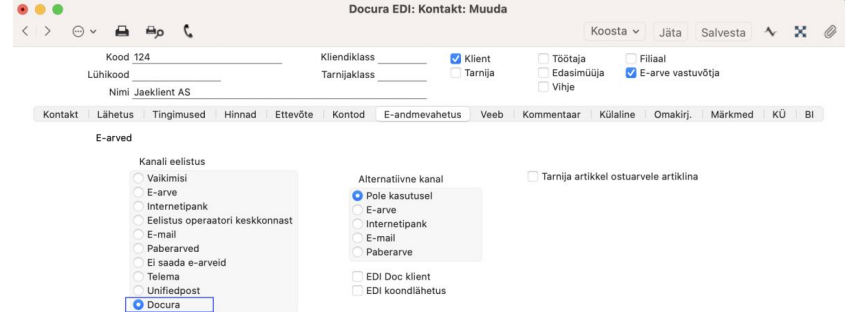
Partner card, tab "E-data interchange": channel preference and the EDI Doc client option.
The step-by-step walkthrough of entering addresses and partner codes is in 01 General description of the Docu-WEB portal
07 Typical mistakes
- The contact code and the delivery location code coincide → the document is matched to the wrong customer or the wrong store.
- The code exists in the ERP but has not been linked in Docura — the record stays in Not linked and the document cannot be matched.
- The same customer has been entered twice in the ERP. Some ERPs then match by the registration number and take the contact with the lowest number. The redundant contact should be marked as closed, or its registration number removed.
- Formatting slips: a leading space, a leading zero or a different separator in the code. Codes must match character for character on both sides.
08 What this means in specific ERPs
- Merit — the store location must have a registration code and/or a VAT code (KMKR), otherwise it is not imported into Docura and an ORDER cannot be sent. See Merit, section 09 QA, question 03.
- SimplBooks — the internal ID of the delivery point is used as the PartyCode in Docura, and if the Delivery point field is not filled in on the invoice, the invoice is not forwarded to Docura at all. See SimplBooks.
- StandardBooks — delivery addresses are entered under Sales management > Settings > Delivery addresses, and they are identified by the code and the GLN; the same codes must be entered in Docura. See StandardBooks, section 02.07.
- Directo — if a document arrives with a client code that is missing either in Directo or at the EDI partner, further processing of that document does not happen. See Directo.
- Tovar — the partner set up in the ERP and the partner in Docura must carry the same code, otherwise the sent document is not accepted by the receiver's system. See Tovar.
09 Checklist before going live
- Every partner (legal entity) has a code and it is linked to the Legal address in Docura.
- Every store or delivery location has its own code, different from the legal code, and it is linked to that store's address.
- GLNs are filled in wherever the partner works with GLNs.
- No records are left in the Not linked section.
- Channel preference (and EDI Doc client, where despatch advices are exchanged) is set on every partner card.
- The registration number and, where applicable, the VAT number are present for every location.
- A test order and a test invoice have been exchanged successfully in both directions.
Read more
- 01 General description of the Docu-WEB portal — registration in the portal, initial setup, daily use.
- 03 Product catalog management
- ERP manuals: Merit, SimplBooks, StandardBooks, Directo, Tovar