


- Table of contents
- Ladu20
- 01 Overview
- 02 Activating Docura EDI in Ladu20
- 03 Connection and credentials
- 04 If the documents do not reach the partner
Ladu20
01 Overview
Ladu20 is an Estonian accounting and warehouse software. It is connected to Docura over the REST API, so business documents are exchanged automatically straight from Ladu20.
With the Docura integration, Ladu20 can exchange:- purchase orders
- sales orders
- sales invoices
- purchase invoices
- e-invoices
- additional reports on request, for example the sales report SLSRPT and the inventory report INVRPT
02 Activating Docura EDI in Ladu20
Two steps are needed to set up and start Docura EDI in Ladu20.
01 Set the EDI channel on the customer card
- Open the customer card in Ladu20. The card starts with the code and the name of the customer: kliendikood, nimi, ärinimi, GLN.
- Open the tab lisa 1 and, in the leping (contract) block, set the field EDI kanal (EDI channel) to Docura.
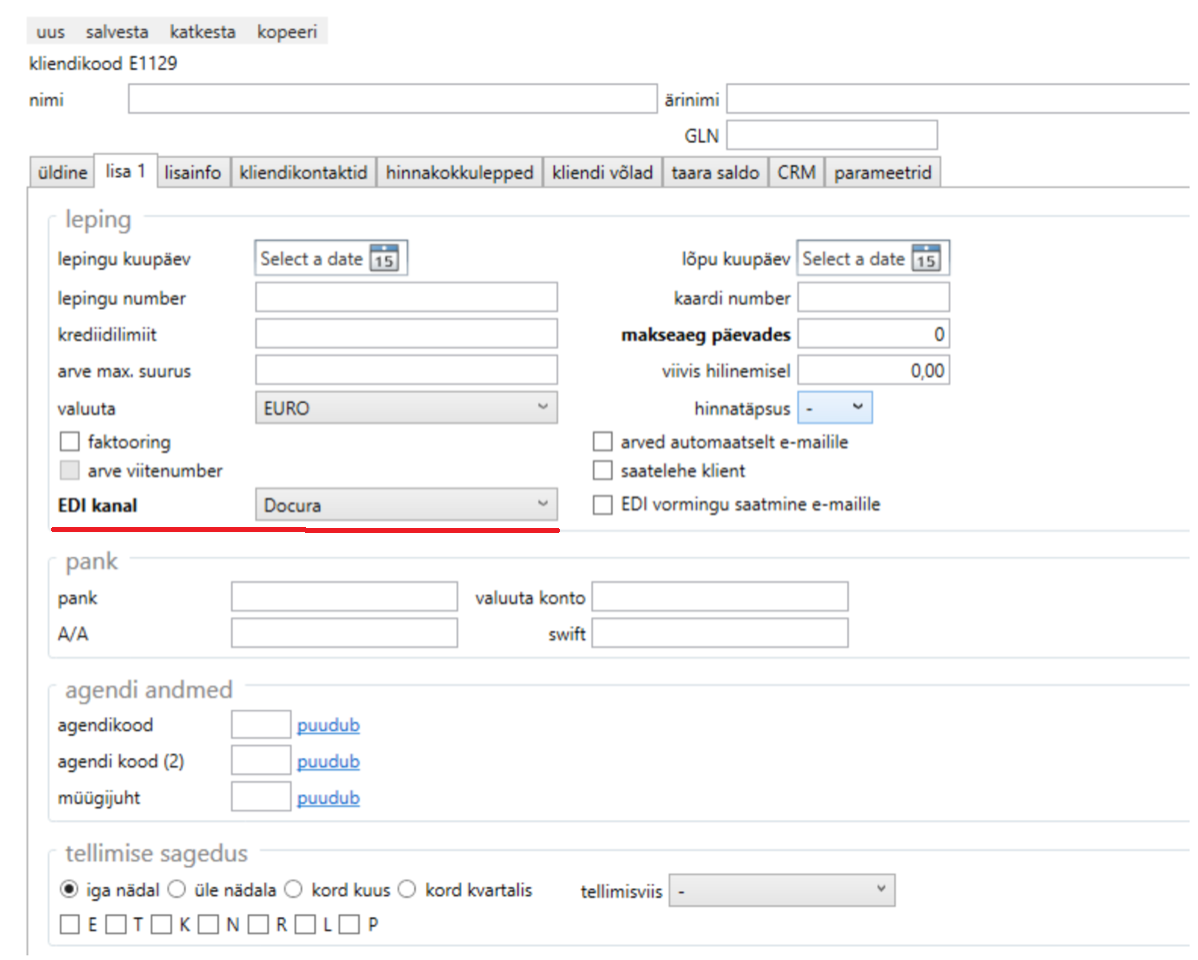
- Save the card (salvesta).
Set EDI kanal = Docura on the card of every customer you exchange documents with.
02 Send the customer code to Docura
Docura must know which customer code Ladu20 sends in its documents, so that the documents reach the right partner.
- Read the kliendikood from the customer card (in the example on the screenshot: E1129).
- Send this code to Docura support (support@docura.net), or enter it yourself in the Docura platform under the corresponding partner.
If the customer has no customer code, the registration number is used instead.
03 Connection and credentials
Ladu20 works with Docura over the REST API. Docura creates a separate web user for the customer and sends the username and the API key (api-key) to the customer. The same credentials are used for the connection on the Docura platform, in Settings → Integrations.
Additional settings – for example activating the sending of SLSRPT or INVRPT – are configured on the Docura side. For such document types the path to the XSLT output (XSLT output SOAP full path with filename [R-R] [S-S]) is specified in the relation settings on the Docura platform.
04 If the documents do not reach the partner
- Check that the customer card has EDI kanal = Docura on the lisa 1 tab.
- Check that the customer's kliendikood has been submitted to Docura and is entered under the correct partner on the platform.
- If the documents still do not arrive, contact Docura support (support@docura.net).